


SEO for wedding photographers is how you get your website in front of couples who are searching Google (and, more and more, AI tools like ChatGPT) for someone like you. It comes down to a handful of things: picking the right keywords, building pages around them, keeping your Google Business Profile current, blogging your real weddings, and making your photos and pages easy for Google and AI search to understand. And with engagement season starting in December, what you set up this fall is what newly engaged couples will find.
Hi, I’m Kelli! 👋🏻 I design Showit websites with SEO built in and write blog posts for wedding pros. Before that, I spent 20 years in the wedding industry myself, including five years running my own floral studio in Austin, so I know how easy it is for your own marketing to slide to the bottom of the list. Earlier this month, I looked up a few of my clients’ blog posts on Google and found 14 of them on page one (eight from two wedding photographers), with a few even showing up in Google’s AI Overviews. 🤩 Below, I’m sharing the exact steps I use for them.
The short version (for busy wedding pros):
- Pick one main keyword for your homepage, usually “[your city] wedding photographer,” and use it in your page title, main heading, and first paragraph.
- Make sure Google can see your site (type site:yourwebsite.com into Google) and set up Google Search Console.
- Fill out your Google Business Profile completely and ask every couple for a review.
- Blog your real weddings, titled with the venue or location couples search for.
- Name and describe your images so they can show up in Google Images.
- Write clear, specific answers on your site so AI tools can understand and quote you.
- Start before engagement season. SEO builds over time, and the couples who get engaged in December start searching soon after.
In this guide:
- What is SEO for wedding photographers?
- Why does SEO matter for wedding photographers right now?
- How do couples search for a wedding photographer?
- How do I choose the right keywords?
- How should I set up my website pages?
- How do I make sure Google can see my website?
- How do I optimize my Google Business Profile?
- How should wedding photographers blog for SEO?
- How do I optimize my wedding photos for Google?
- How do I show up in AI search?
- How do I know if my SEO is working?
- What mistakes keep wedding photographers off page one?
- What should I do before engagement season?
- Should I do SEO myself or hire help?
- Frequently asked questions
What is SEO for wedding photographers?
SEO (search engine optimization) is how Google figures out what your website is about, where you work, and who to show it to. For a wedding photographer, the goal is simple: when a couple searches for a photographer in your area, a venue you shoot at, or a question you can answer, your website is one of the results they see.
Today, couples can find you in four places through search:
- Google’s regular results: your homepage, service pages, and blog posts.
- Google Maps and your Google Business Profile: the map listings that show up for local searches.
- Google Images: your photos, linked back to your blog posts and galleries.
- AI answers: ChatGPT, Perplexity, Claude, and the AI Overviews at the top of Google, which write an answer and often name a few businesses.
That last one has its own name. GEO (generative engine optimization) is making your website clear and specific enough that AI tools understand what you do, where you do it, and who you do it for, so they can pull from your site when they answer. Good SEO and good GEO overlap a lot, and I’ll cover both in this guide.

Why does SEO matter for wedding photographers right now?
Couples who find you on Google are already looking for a photographer. They typed the search themselves. That’s a very different starting point from someone scrolling past your Reel. 😅
SEO also keeps working when you’re too busy to. A wedding pro once told me, “I do not have time to do any of this,” and in October, that’s most of us. When I searched earlier this month, Lisa Hause Photography had six blog posts on page one of Google, and several of them went live in 2025. They’re still showing up in October 2026. Each post was written once, and it’s been showing up for couples ever since. No trending audio, no posting every day to keep up with the algorithm. 🤳🏼
Timing matters too. Engagement season starts in December. Couples who get engaged over the holidays start looking for their vendors soon after, and SEO isn’t a switch you flip the week you need inquiries. What you set up in October and November has time to settle in before they start searching.
And if you’ve ever plowed through the fall wedding season, checked out after Thanksgiving, and then looked at an empty January calendar with a pit in your stomach, this is how you avoid that. Panic seasons in business can be prevented with a little planning.
How do couples search for a wedding photographer?
Couples don’t all search the same way. Some know exactly what they want, and some are still figuring out the basics. Each type of search needs a different kind of page.
| How couples search | Example search | The page that should show up |
|---|---|---|
| By location | austin wedding photographer | Your homepage or wedding photography service page |
| By venue | umlauf sculpture garden wedding | A blog post or venue guide about that venue |
| By style | fine art wedding photographer austin | Your homepage or service page, if that’s your style |
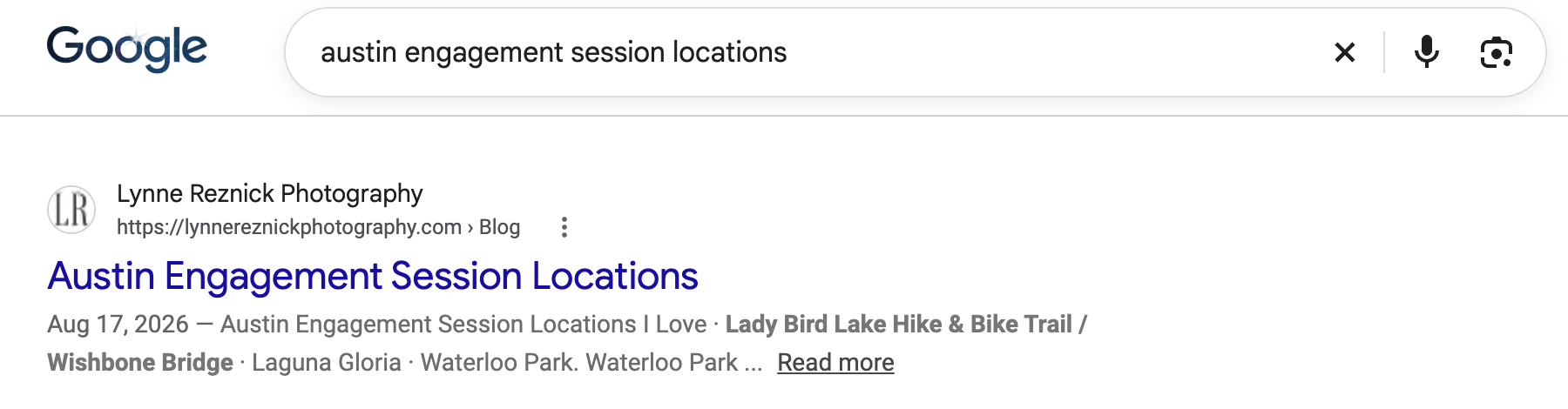
| By planning question | austin engagement session locations | A helpful blog post that answers the question |
| By a niche detail | dog friendly austin wedding | A blog post or guide written for that specific couple |
These are real examples. Lisa Hause Photography’s dog friendly Austin wedding guide and UMLAUF Sculpture Garden wedding post, and Lynne Reznick Photography’s Austin engagement session locations post, were all on page one when I searched these terms.
The more of these search types your site covers, the more ways couples can find you.
How do I choose the right keywords?
A keyword is the phrase a couple types into Google. Your main keyword is the one you most want to be found for, and it usually belongs on your homepage.
For most wedding photographers, the main keyword is “[your city] wedding photographer” or “wedding photographer [your city].” If you work across a region, it might be something like “hill country wedding photographer.”
How to pick yours:
- Make a list of the cities, regions, venues, and styles you want to be known for.
- Check the numbers in a keyword tool like Ubersuggest. Look at monthly search volume (how many people search it) and SEO difficulty (how hard it is to rank for). A phrase with a few hundred searches you can rank for beats a huge one you can’t.
- Check who’s searching. Google the phrase yourself and look at what comes up. When I researched keywords for my own blog, “wedding website design” looked like a great target with thousands of searches a month. But the results were full of couples building their own wedding websites on The Knot and Zola. Wrong audience completely. 😂 Always check the results before you commit to a keyword.
- Give each page one main keyword. Your homepage targets your city. A venue blog post targets that venue. If two pages target the same phrase, they compete with each other, and neither does as well.
How should I set up my website pages?
Once you know your keywords, put them where Google looks. For each important page, use the page’s main keyword in:
- The page title (also called the SEO title or title tag): what shows up as the blue link in Google
- The main heading (H1) on the page, and only one H1 per page
- The first paragraph of text
- The URL, when you’re creating a new page
- The meta description: the short summary under your link in Google
- Image file names and alt text, using natural variations
Pages most wedding photographers need:
- Homepage: says what you do, where, and for whom in the first few lines, in real text (not just inside an image).
- Wedding photography service page: what’s included, who it’s for, where you work, and how to inquire.
- About page: your story, plus one clear paragraph with the facts: your business name, location, how long you’ve been shooting, and who you work with.
- Portfolio or gallery pages: with real words on them, not just photos.
- Location or venue pages for the areas and venues you most want to book.
- Contact page with a form that works.
What this looks like on a homepage: a page title like “New York Wedding Photographer | [Your Business Name],” a main heading like “New York Wedding Photographer for Joyful, Documentary-Style Weddings,” and a first paragraph that says where you work (“photographing weddings in New York and the greater Hudson Valley”) and who you love working with. Swap in your own city, style, and words. A couple, and Google, should be able to tell in five seconds what you do and where.
Gallery pages need words too. Google can’t look at a gorgeous reception photo and know it was taken at a garden venue in Charleston. A few sentences about the venue, the season, and the couple’s day give Google (and AI tools) something to read.
If your site is on Showit: each page has its own SEO settings where you can set the page title and description, and every image has an alt text field. Check that none of your pages are set to be hidden from search engines, since that’s sometimes left on from when the site was being built. And make sure your most important text is real text, not part of a designed image.

How do I make sure Google can see my website?
None of the other steps matter if Google can’t find your pages.
Start with a quick check. Type site:yourwebsite.com into Google (with your real domain). If you see a list of your pages, Google can find your site. If nothing shows up, or only a page or two, fix that first. A brand new site can take a little time to get picked up, and sometimes a setting that tells Google to skip your pages gets left on after launch.
Then set up Google Search Console. It’s free, it comes from Google, and it shows you:
- Which pages Google has indexed (saved and can show in results), and which it hasn’t
- Which searches your site is showing up for, and how often people click
- Any problems Google ran into on your site
Once it’s set up, submit your sitemap, and use the URL Inspection tool to request indexing every time you publish a new blog post.
Set up Bing Webmaster Tools too. It takes a few extra minutes, and many AI tools pull information from search indexes like Bing’s, so it’s worth being there.
How do I optimize my Google Business Profile?
Your Google Business Profile is what shows up on Google Maps and in the map results for local searches. For a lot of couples searching “[city] wedding photographer,” it’s one of the first things they see.
To set it up well:
- Choose the right primary category. Wedding photographer, if that’s your main service.
- Set your service area if you travel to clients instead of meeting them at a studio.
- Write a clear description of what you do, where, and who you serve.
- Add your services and link to your website.
- Upload photos regularly, not just once when you set it up.
- Ask every couple for a review, and reply to the reviews you get.
- Keep your business name, location, and contact info identical on your website, Google Business Profile, Instagram, and any directory listings. Consistency helps Google and AI tools trust they’re looking at the same business.

How should wedding photographers blog for SEO?
Blogging is how you show up for all of those venue, location, and planning searches your homepage can’t cover on its own. It’s also the easiest part to skip, because it always gets pushed to “after wedding season.” 😬
Title your posts with what couples search for. This one change makes the biggest difference. “Emily + James” tells Google almost nothing. “A Fall Wedding at UMLAUF Sculpture Garden in Austin” tells Google exactly what the post is about and who should see it.
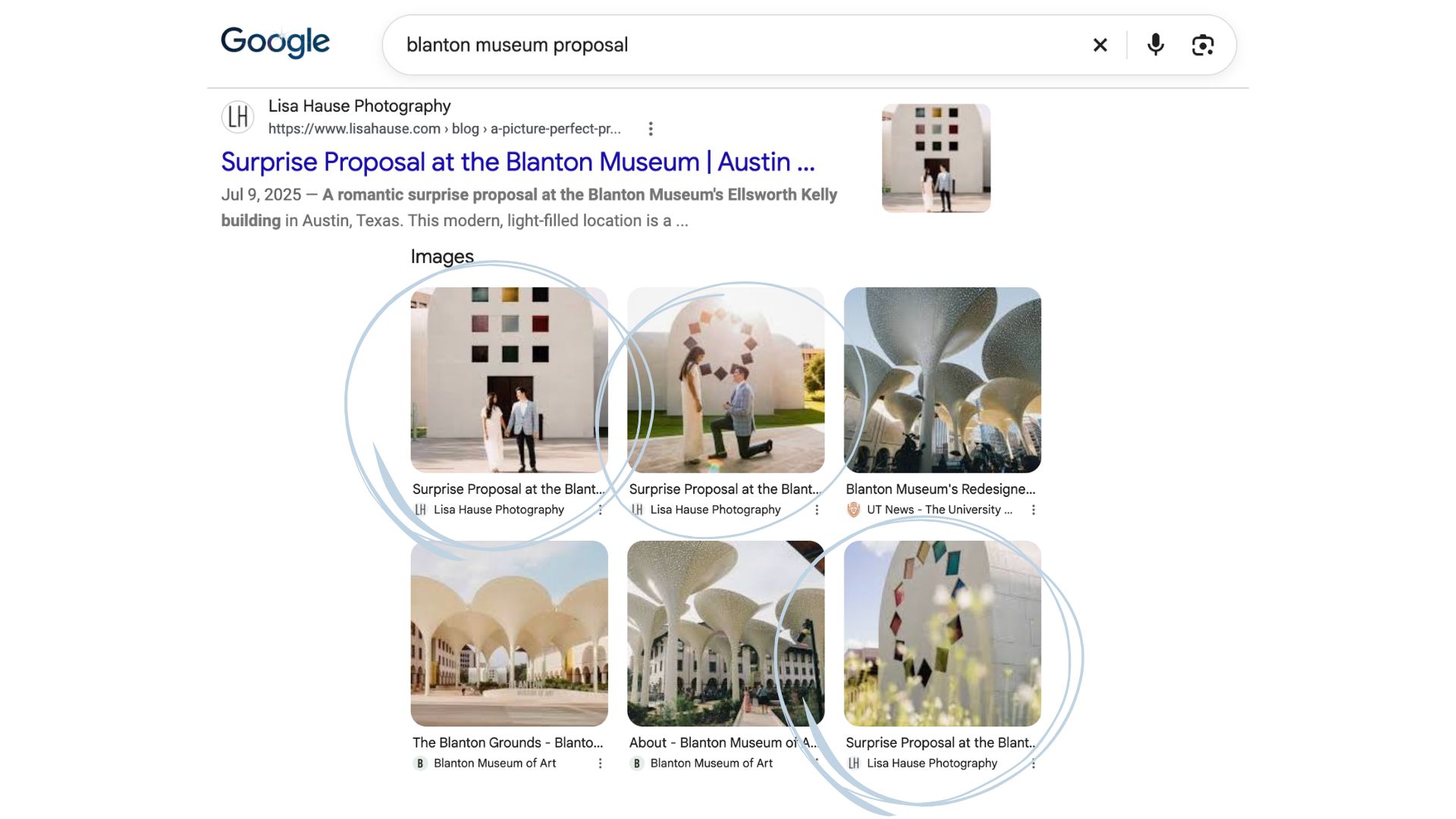
Lisa Hause Photography’s page-one posts are a great example. Here’s what they’re about:
- A dog friendly Austin wedding guide
- A surprise proposal at the Blanton Museum
- Getting married in Lockhart, Texas
- Why the Austin Public Library is a great wedding venue
- Getting married at the Wildflower Center
- Reasons to have an UMLAUF Sculpture Garden wedding
Every one of those answers something a couple is searching for. None of them are just a couple’s names and a date.
What to put in each post:
- A title with the venue, location, or question
- An opening paragraph that says what the post is about and who it’s for
- A few real paragraphs: the venue, the season, the light, what made the day work, and tips for couples considering the same place
- Images that are named and described (more on that below)
- Links to your services or inquiry page, and to related posts
- Clear headings, so both readers and AI tools can skim it
What to blog about:
- Real weddings, titled by venue
- Venue guides (“What to know about getting married at [venue]”)
- Engagement session and proposal locations in your area
- Planning questions couples ask you, like when to book or how long they need coverage
- Niche guides for the couples you love working with: elopements, dog friendly weddings, small weddings
- Questions other wedding pros ask you (Lynne Reznick Photography’s post on hiring an associate photographer was cited in Google’s AI Overview)
How often: steady and consistent wins here. Even one or two strategic posts a month adds up, as long as each one targets something real couples search for.
Don’t forget your old posts. Refreshing a strong older post with new photos, better headings, and updated info can be worth more than writing a new one.
How do I optimize my wedding photos for Google?
Your photos can show up in Google Images and link people back to your site. When I searched “umlauf sculpture garden wedding,” Lisa Hause’s photos showed up right in the Google Images row, linked to her blog post.
Name your files before you upload them. Instead of DSC_4821.jpg, use something descriptive, like umlauf-sculpture-garden-wedding-ceremony.jpg. Vary the names across a gallery instead of repeating the exact same one.
Write alt text that describes the photo. Alt text is a short description that helps Google (and people using screen readers) understand the image. Describe what’s in the photo, and include the venue or location when it fits naturally. For example: “Bride and groom walking down the aisle at UMLAUF Sculpture Garden in Austin.”
Keep file sizes small. Giant files slow your site down, especially on phones, where most couples are browsing. Export your blog images at web size, compress them, and use a modern format like WebP if your platform supports it.

How do I show up in AI search?
More people now ask AI tools their questions, like ChatGPT or the AI Overview that shows up at the top of Google. Ask one “Who’s a good wedding photographer in Austin?” and you won’t get a list of ten websites to click through. You get a written answer, often naming a few businesses and linking to where that information came from.
AI tools tend to pull short passages from pages, not entire websites. A page that builds mood for four scrolls before saying what you do has nothing for them to quote. A clear sentence like “I’m a wedding photographer based in Austin, Texas, photographing weddings across the Hill Country” does.
To make your site easier for AI tools to understand:
- Answer real questions clearly, in the first sentence or two under each heading.
- Use question-shaped headings on blog posts and FAQ sections, written the way couples ask.
- Add an FAQ section to your service page with the questions couples ask you most.
- Write one fact paragraph on your About page: business name, location, how long you’ve been in business, and who you serve.
- Keep your details consistent everywhere your business appears online.
- Get mentioned in more places than your own site: Google reviews, vendor features, directories, and podcast or guest spots all help.
- Check that your site isn’t blocking AI tools. Your robots.txt file can allow or block crawlers like GPTBot (ChatGPT) and PerplexityBot. If you’re not sure, ask your website designer to check.
- Share what only you know. Your real experience, opinions, and results are the parts no one else can copy.
I’m still learning this one myself (I’m working through a 2026 course update right now🤓), and I’m already seeing it work for clients!!
How do I know if my SEO is working?
One of my clients put it perfectly: “I’ve noticed more Google related inquiries, but not sure what they tie back to.” These four checks will tell you.
- Google Search Console: check which searches you’re showing up for, how often, and how many people click.
- A rank tracker: tools like Ubersuggest let you track where your main keywords rank over time.
- Your inquiry form: add a “How did you find me?” question, and look for answers like Google, a venue name, or a blog post.
- AI checks: a few times a year, ask ChatGPT and Google’s AI Mode questions like “Who are the best wedding photographers in [your city]?” and “Tell me about [your business name].” Note whether you’re named, and which sources they cite.
Look for trends over a few months, not day to day. Rankings move around.
What mistakes keep wedding photographers off page one?
When a wedding pro’s site isn’t showing up, it’s usually not one big thing. It’s a handful of small ones that add up:
- Blog posts titled with only the couple’s names. Beautiful for the couple, invisible on Google.
- Gallery and portfolio pages with no words. Google can’t read a photo the way a couple can.
- Your city never mentioned on your homepage, or only mentioned in your footer.
- Important text built into images, like a headline designed into a graphic. Google and AI tools can’t read it as text.
- A “hide from search engines” setting left on after a new site launches.
- Two pages targeting the same keyword, so they compete with each other instead of helping each other.
- Huge image files that slow your site down on phones.
- Your business name, location, or contact info written differently across your website, Google Business Profile, and directories.
- Nothing new since launch. No new posts, no updated portfolio, no fresh photos on your Google Business Profile.
If a few of these sound familiar, that’s normal. Each one is fixable, and fixing even two or three can make a real difference in what Google understands about your business.

What should wedding photographers do for SEO before engagement season?
You’re in the middle of peak season, so here’s a realistic plan for the weeks before December. Each step fits in between weddings.
| When | What to do |
|---|---|
| This week | Search your business name, then “[your city] wedding photographer.” Write down what shows up. |
| This week | Run the site: check and set up Google Search Console if you haven’t. |
| Next 2 weeks | Blog 2 or 3 of this season’s galleries, titled with the venue or location. |
| Before Thanksgiving | Put this year’s best work on your homepage and portfolio, with words that say what you do and where. |
| Before Thanksgiving | Fill out your own inquiry form and make sure it lands in your inbox (not spam). |
| Before December | Ask your fall couples for Google reviews while the day is fresh. |
| January | Check Search Console and see what’s starting to show up. |
If your site shows up for your business name but not for “[your city] wedding photographer,” Google knows who you are but not what you do or where. That’s usually fixed with better page titles, more words on your pages, and blog posts.
Does this work for florists, planners, and venues too?
Yes. I wrote this with photographers in mind, but almost every step works for any wedding pro.
- Florists: blog your installs by venue and season, and name the venue in your image files.
- Planners: venue guides and planning questions make great posts.
- Venues: answer the questions couples ask on tours, one post at a time.
Should I do SEO myself or hire help?
You can absolutely do this yourself, and this guide gives you the steps. The question is usually time. Another wedding pro told me her marketing “wasn’t getting done” because her clients always came first. If that’s you in October, you’re in good company. 😅
A few ways I can help:
- SEO Glow-Up: for a website you love that needs help showing up on Google before engagement season.
- Ongoing blogging: I turn your real weddings into blog posts that keep working all year. As one blogging client, Hannah Kiemel, put it: “She has helped us get more inquires and way more traffic to our website!”
- Website Design + SEO: I have one spot left for 2026, starting in November or December. With an 8 to 12 week build, that means a new site in early 2027. After that, I’m booking 2027 projects, and Website Design + SEO pricing goes up in the new year.
If you want your website ready for engagement season, start with an SEO Glow-Up or see all of my services.
Frequently asked questions about SEO for wedding photographers
How long does SEO take for wedding photographers?
SEO takes months, not weeks, and it keeps building over time. That’s why starting before engagement season matters. The upside is that good posts keep working: some of Lisa Hause Photography’s page-one posts went live in 2025 and still show up today.
Do wedding photographers need a blog for SEO?
A blog isn’t the only way to show up on Google, but it’s the easiest way to show up for venue, location, and planning searches your homepage can’t cover. It also turns galleries you already have into something couples can find.
What’s the best free SEO tool for wedding photographers?
Google Search Console. It’s free, it comes straight from Google, and it shows which searches your site appears for and whether your pages are indexed.
Is Instagram enough to get found?
Instagram is great for staying in touch with people who already follow you. But couples who don’t know you yet often start on Google, and your website is what shows up there. Instagram doesn’t have to carry your whole marketing strategy.
Can ChatGPT recommend my photography business?
It can, but no one can guarantee it. What you can control is making your site clear and specific, keeping your details consistent online, and getting mentioned in more places than your own website.
Does SEO for wedding photographers work if I’m on Showit?
Yes. Showit lets you set page titles, descriptions, and image alt text, and Showit blogs run on WordPress, so you can use the same blog SEO steps in this guide.
💍 Engagement season will be here soon, and your website can be ready for it. If you’d rather hand SEO off (or you just want a second set of eyes on your site), let’s chat. I’d love to hear about your business and what you’re hoping 2027 looks like! 🫶🏻
About Kelli Michelle Creative Co.
Kelli Michelle Creative Co. is a website design, SEO, and blogging studio for creative wedding professionals, founded in 2024 by Kelli and based in Georgetown, Texas, just north of Austin. Before she started designing websites, Kelli spent nearly 20 years in the wedding industry, starting with a wedding florist at Texas A&M in 2006 and later owning her own floral design studio in Austin for five years. She knows firsthand how easy it is for gorgeous galleries to pile up during busy season. That’s why she helps florists, photographers, planners, stationers, and venues turn their real weddings into blog posts that keep working all year. She also designs semi-custom Showit websites with SEO built in from the start, and offers SEO Glow-Ups for sites that need a little help showing up on Google.


If your website feels outdated or pieced together, start here. This free guide walks you through what every page of a wedding pro's website should be doing, so you know what's working, what's missing, and what to tackle first.
The Wedding Pro Website Blueprint
the free guide!
WEDDING PRO WEBSITE BLUEPRINT

